Yes, Your Podcast App Already Has One
Apple Podcasts, Pocket Casts, Overcast, Castro and Spotify all ship with a built-in sleep timer, so if the question is simply \"which app has this feature,\" the honest answer is: most of them, and you probably already have one installed. Apple Podcasts buries it under the sleep icon on the now-playing screen. Pocket Casts and Overcast are usually rated the best implementations because they let you shake the phone to add five or fifteen more minutes without unlocking the screen, which matters more than it sounds once you're half asleep and fumbling. Spotify's timer sits in the same place as its music timer, under the three-dot menu.
So the app question is answered in under a minute of settings-menu digging. The more useful question, the one nobody actually typed into Google but should have, is whether a podcast is the right thing to be feeding into that timer in the first place. That's what the rest of this is about.
How These Timers Actually Work
Most podcast sleep timers give you three options: a fixed number of minutes, end of the current episode, or end of the current chapter if the podcast has chapter markers. The fixed-minute option is the blunt instrument. It cuts the audio the moment the clock runs out, which means you might get silence mid-word, mid-ad, or mid-laugh. End-of-episode is gentler on the ears but useless for sleep timing since episodes run anywhere from twenty minutes to three hours.
What almost none of them do well is fade. A hard stop is a small but real jolt, the audio equivalent of someone switching off a light rather than dimming it. Music apps built specifically for sleep tend to fade the volume down over the last thirty to sixty seconds instead of cutting it, which is a small detail that makes a real difference to whether the stop actually registers as \"disturbance\" to a lightly sleeping brain.
The Problem Nobody Mentions: Content Matters More Than the Timer
Here's the part most articles on this topic skip entirely. A sleep timer only controls when the audio stops. It does nothing about what your brain is doing for the forty minutes before that. And podcasts, almost by design, are built to keep your attention rather than let it go.
Think about the mechanics of a typical episode: a cold open designed to hook you, a host who varies pace and volume for emphasis, an ad read that's often mixed louder than the show itself, a narrative arc that your brain wants resolved. Even a calm-voiced interview show is still a story, and stories activate the same prediction and attention circuits whether you're wide awake on a train or trying to drift off at 11pm. That's not a criticism of podcasts. It's just not what they were built for.
Where a Sleep Timer Actually Earns Its Keep
A sleep timer does its best work paired with audio that's engineered to wind down rather than pull you in. That usually means something with a steady, slow tempo, roughly 60-70 bpm, close to a resting heart rate, with no lyrics competing for language processing and no volume spikes to react to. This is the difference between a track that's arranged to descend, getting sparser and quieter as it goes, and a podcast episode that has to keep giving you a reason to stay tuned in.
It's also where layering helps. A single steady pad is good; a pad plus rain plus a very low string line, each at a level you've set yourself, is better, because it masks the sudden noises in your house and neighbourhood that actually cause micro-wakings.
That's the sound mixer in My Zen Zone, three nature layers each nudged to its own volume rather than a single fixed playlist track. You build the exact texture that works for your room instead of accepting whatever the podcast producer decided the ad break should sound like.
If You Already Fall Asleep to Voices, Keep Doing That, With One Change
Plenty of people genuinely do fall asleep faster to a familiar voice than to any amount of ambient music, and there's no need to fight that if it works for you. The trick is choosing content with low narrative stakes. A geology lecture, a history podcast you've already heard twice, a very slow true-crime rewatch where you know the ending, all of these work better than anything with a cliffhanger, because your brain isn't holding a thread open waiting to see what happens.
The other option, if you like a voice but want it working with the wind-down rather than against it, is a guided session where the voice sits over calm music rather than instead of it.
That's a guided session with Voice, Music and nature sound as separate layers, each with its own play button and its own level, so you can bring the voice down and let the music carry on once you've stopped needing the instructions. Most apps stop the music the moment the voice starts. Here it plays underneath the whole time.
What a Sleep Timer Looks Like When It's Built for Sleep, Not Attention
My Zen Zone's timer works the way you'd want a podcast one to: pick a duration, and the track fades rather than cuts, with the mixer levels fading proportionally so nothing drops out unevenly. Tracks are downloadable, so a flight or a spotty hotel wifi connection doesn't leave you stuck mid-fade with a spinning wheel. And because every track is composed and recorded in-house by one person rather than licensed in bulk, the library has a consistent, deliberately slow character rather than the wildly mixed tempos you get scrolling a generic \"sleep sounds\" playlist.
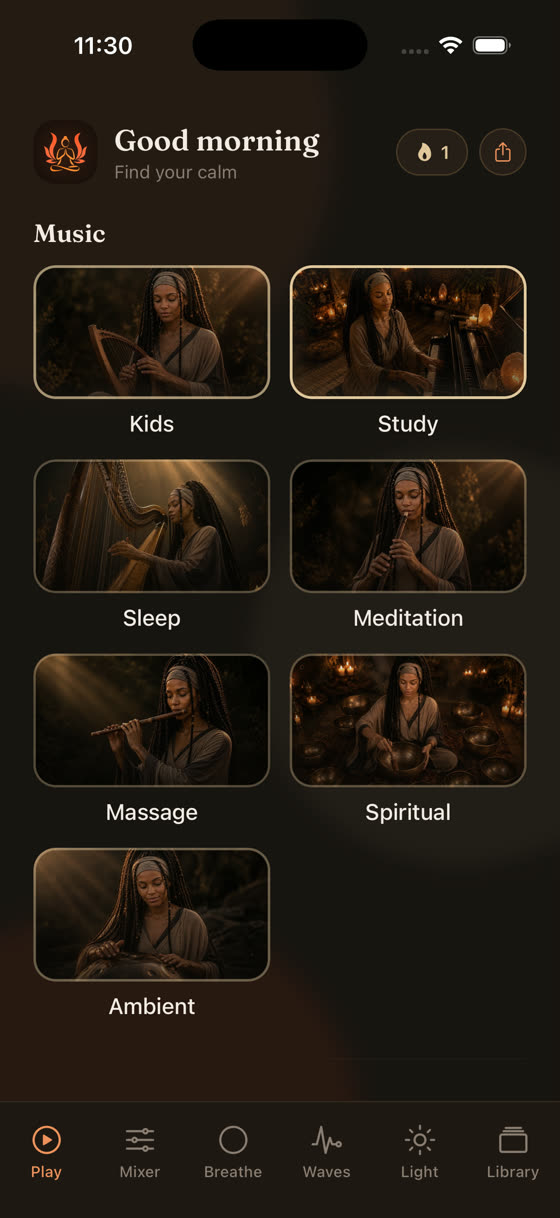
The home screen splits things into Sleep, Focus, Meditation, Calm and Music as separate worlds, so a track built for descending into sleep never gets mixed in with something meant to hold your attention for deep work.
What To Do Differently Tonight
If you've been using a podcast and a sleep timer out of habit, try one small experiment tonight. Pick something with a fade rather than a hard cut, keep the volume lower than feels natural at first, and if you're reaching for a podcast, choose the most boring option in your library rather than the most interesting one. If you'd rather remove the narrative question entirely, swap it for something built with sleep as the only goal; we've written more on what actually works for sleep music if you want the longer version of that argument.
The light screen is worth trying in that last half hour too, a slow, dimming visual to look at instead of a bright screen while the audio fades out under it. Between the timer, the mixer and the light screen, the aim isn't to replace your podcast habit outright, just to give the last twenty minutes of the day something that's actually built for winding down rather than staying tuned in. You can try the whole library free at myzenzone.app/get, or see the full range of what's inside at myzenzone.app.
Common questions
Does Spotify have a sleep timer for podcasts?
Yes. Open an episode, tap the three-dot menu, and choose Sleep Timer. You can set it in fixed intervals or to stop at the end of the current episode. It works the same way for music, so it's the same menu either way.
Will a podcast sleep timer stop mid-sentence?
Often, yes, if you use a fixed-minute timer rather than end-of-episode. Most podcast apps cut the audio abruptly rather than fading it, which can register as a small disturbance if you're already lightly asleep. Apps built specifically for sleep audio tend to fade the last 30-60 seconds instead.
Is it bad to fall asleep to podcasts every night?
There's no solid research saying it's harmful, so we won't claim otherwise. The honest concern is that narrative content keeps your attention networks more engaged than steady, wordless audio, which may make it harder to drop into deeper sleep. If you sleep fine on podcasts, there's no need to change anything.
Can I set a sleep timer on music tracks in My Zen Zone?
Yes, every track and mixed session has a sleep timer with a fade-out rather than a hard cut, and your mixer levels fade proportionally so the whole soundscape winds down together instead of one layer dropping out abruptly.
What's the difference between end-of-chapter and a fixed-minute timer?
End-of-chapter uses markers some podcasts include to stop cleanly at a natural break, avoiding a mid-sentence cutoff. Fixed-minute timers stop at an exact time regardless of what's playing, which is more predictable for planning your wind-down but riskier for landing mid-word.