The short answer
You don't need a special app for Alexa to get brown noise. Just say "Alexa, play brown noise" and an Echo device will loop a generic track from Amazon's own library. It works, it's free, and for a lot of people that's the end of the story. But if you've landed on this question, you've probably already tried it and found it thin, tinny, or oddly fatiguing after twenty minutes. That's not you being fussy. It's a real limitation of both the hardware and the one-size-fits-all loop, and it's worth understanding why before you go hunting for a fifth Alexa skill that promises to fix it.
What brown noise actually is
Brown noise (sometimes called red noise) isn't just "deeper white noise." White noise has equal energy across every frequency, which is why it sounds like a hiss. Pink noise drops off gently as frequency rises. Brown noise drops off much more steeply, roughly 6dB per octave, so the low end dominates and the top end all but disappears. That's why it sounds like a waterfall, distant thunder, or a jet engine heard through a wall rather than a radio between stations. The heavy low-frequency content is exactly what a lot of people find settling, but it's also exactly what small speakers struggle to reproduce.
Why Alexa and brown noise don't always get along
Most Echo speakers, including the standard Dot, have small drivers with limited bass extension. Ask them for a sound that's mostly built from low frequencies and you get a version with the bottom rolled off, which changes the character completely. It ends up sounding more like static than the deep rumble people are actually after. On top of that, the built-in Alexa loop is short and fixed. If you listen closely you'll hear the seam where it repeats, and there's no way to layer it with anything else, fade it out over time, or nudge the tone. It's one sound, one volume, on a loop, on a speaker that isn't really built for it.
What most "best app for Alexa" lists get wrong
A lot of roundup articles just list third-party Alexa skills without actually testing what happens after the first thirty seconds. Many skills use compressed, low-bitrate loops with an audible restart point, some interrupt with ads or upsells, and almost none let you adjust anything beyond stop and start. The real question isn't "which skill has brown noise" - nearly all of them do, badly. The real question is whether you want a single flat sound at all, or whether what you're actually chasing is a state: something to mask a partner's breathing, quiet a busy head, or make a small bedroom feel less exposed. That's a different problem, and it's one a smart speaker with a fixed skill catalogue isn't built to solve.
A setup that actually works better
If your Echo is in the bedroom already, the simplest fix is to stop asking it to generate the sound itself and instead let it play something from a phone or tablet over Bluetooth, or just use the phone speaker or a small Bluetooth speaker on the nightstand. This sounds like a small distinction but it changes everything, because now you're not limited to Amazon's one loop. You can reach for proper low-end textures alongside rain, static hums, or ocean layers, and actually shape them.
My Zen Zone isn't an Alexa skill, and we won't pretend it is. What it gives you instead is a mixer: several sound layers, each with its own level, that you build yourself rather than accept as a fixed loop.
The mixer is the actual difference
Watch what happens when you pull one layer down and push another up mid-session: the balance shifts in real time, nothing cuts out or restarts, and you end up with a texture that's yours rather than a stock file. That's the gap between an Alexa command and an app built for this specifically. Instead of one deep rumble at one fixed volume, you can sit a low, brown-noise-style layer underneath a thinner rain texture, or bring in a faint hum for the hours you actually want masking and fade it back as the room goes quiet. It's closer to what a sound designer would build for you individually than what a smart speaker can generate from a spoken command.
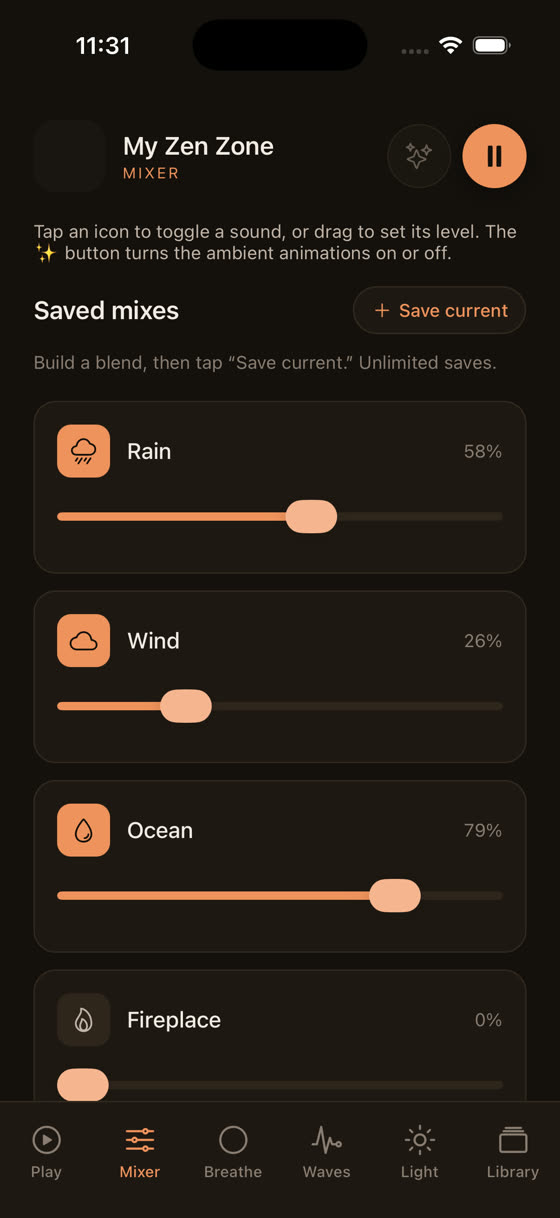
That screen is the whole point. Three sliders, three sounds, and you decide what sits loudest. Nobody's skill library does that, because a skill is a single audio file with a name attached to it, not an instrument.
Building a proper wind-down, not just a noise loop
Brown noise on its own solves masking, but it doesn't solve the ten minutes before you actually want to be asleep, when your head is still going over tomorrow's first meeting. That's a separate problem, and worth treating as one rather than expecting one looped sound to cover both jobs.
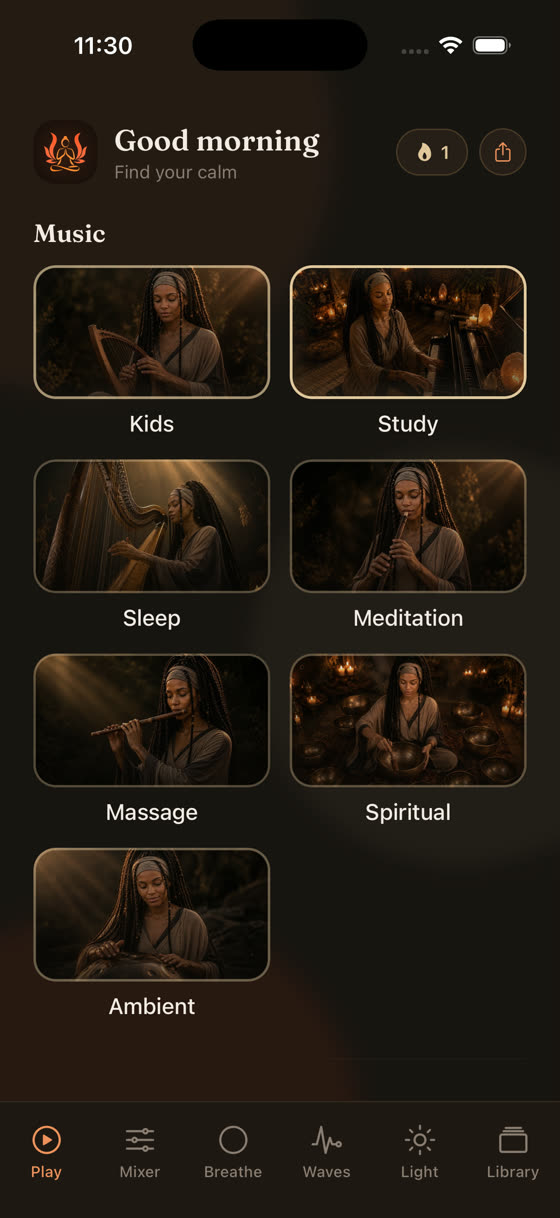
Each category in the app sits as its own space rather than one long undifferentiated list, so you're not scrolling past focus music at 11pm looking for something calming. If you're building an actual pre-sleep routine rather than just reaching for noise, it's worth reading how tempo and instrumentation affect winding down in our piece on the best music for sleep, and the same logic about matching sound to the actual problem applies during the day too, covered in music for focus and study if brown noise is something you're also reaching for at a desk.
Timers, offline downloads, and why the library keeps changing
One thing Alexa does have going for it is that it stops on its own if you fall asleep with a sleep timer set. Any decent app should match that at minimum, and this one does, alongside offline downloads so a patchy Wi-Fi connection at 2am doesn't cut the sound out mid-loop, which is its own kind of unpleasant wake-up. The library also isn't static. New tracks are added roughly every two weeks, made by one working musician rather than pulled from a stock library, so the low-frequency textures you're using for masking are actually varied over months rather than the same three-minute file on permanent repeat.
The honest bottom line
If all you want is a quick, free brown noise loop and you're not fussy about depth or seam-free playback, Alexa's built-in command does the job and there's no need to install anything else. But if you've noticed it sounds thin, if you're pairing it with a partner who wants something different, or if the real goal is an actual wind-down rather than one static sound, a phone-based app with a proper mixer gets you there in a way a spoken command to a smart speaker structurally can't. You can see the whole thing, including the mixer and the rest of the library, at the download page, and decide for yourself whether one fixed loop was ever really what you wanted.
Common questions
Does Alexa have real brown noise or just white noise relabelled?
Amazon's built-in "brown noise" command plays an actual brown noise loop, not relabelled white noise. The issue isn't authenticity, it's playback: small Echo speakers roll off the low frequencies that give brown noise its character, so it can sound thinner and more static-like than the same file played through a proper speaker.
Can I use My Zen Zone through an Echo speaker?
Not as a skill directly, but you can play it from your phone over Bluetooth to any Echo or other speaker, which actually gives you more control than asking Alexa directly, since you can mix and layer sounds rather than accept one fixed loop.
Is brown noise actually better than white or pink noise for sleep?
There's no solid research showing one is definitively better for sleep. It comes down to personal preference: some people find brown noise's heavier low end more soothing and less fatiguing over hours, others prefer pink noise's gentler balance. Worth trying both rather than assuming one is objectively superior.
Why does my Echo's brown noise seem to loop or repeat?
Because it is a fixed, short audio file playing on repeat rather than a continuous generative sound. You'll notice the seam more on longer listening sessions or with headphones. Apps with longer files or live mixing avoid this by blending several layers so no single repeat point stands out.
Is it worth paying for a brown noise app if Alexa's is free?
If a free fixed loop already works for you, there's no need to pay for anything. It's worth considering a paid app only if you want more than one sound, want to adjust levels yourself, need offline playback, or want a proper wind-down routine rather than just background masking.